Wednesday, June 01, 2016

Enable PING Windows 8

How to Enable Ping Reply/Response in Windows 8 and 8.1 – Simple Steps

By default Windows 8 and 8.1 come with enabled Windows firewall which will not respond to ping requests from other networked devices. Even though you can access network shares from your Windows 8 desktop or laptop but still it will not respond to ping request  by saying ‘Request Timed Out’ message.  Here is the simple way to enable ping reply or response in Windows 8 and 8.1  by modifying ICMP Echo rule without completely disabling Windows firewall.
In Windows 7 we had to create a rule to enable ping but Windows 8/8.1 got built-in rule which needs to be enabled.  By completely disabling firewall in Windows 8 will respond to ping requests, but its not the recommended way of doing in terms of network and computer security. Disabling the firewall just for ping request will put the computer in high network threats and attacks.

Enable Only ICMP Echo Requests in Windows 8/8.1 to Responds Ping commands

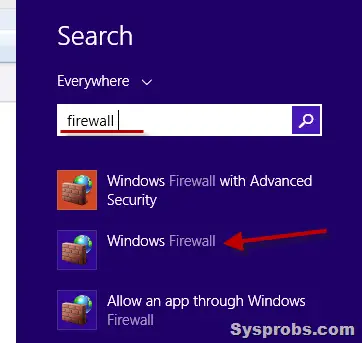
1) Open Windows firewall settings.  Search for ‘firewall’ in search (from charm bar) and click Windows firewall. It can be accessed from Control Panel also.
search for firwall
2) Here you can completely turn off the firewall, so ping reply will work but it’s not recommended and we are not going to do it.
Select Advanced settings to open more and advanced Windows firewall settings.
advanced settings
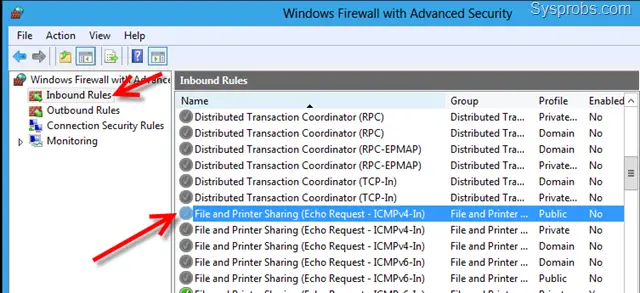
3) There are pre made ICMP Echo rules available in Inbound Rules, we just need to enable that.
You must consider two facts while enabling the rule,
a) Network protocol type ( Is it IPv4 or IPv6?)
b) Network location type ( Is it Private or Public or Domain network?)
Mostly we would be needing to enable ping on Private or Domain network only, not for Public network. Select the correct rule matching in your scenario and enable it by right clicking and select Enable Rule.
requred rules to enable
right click and enable
That’s it, we have just enabled the ping response or reply in Windows 8 or 8.1 without disabling the Windows firewall.  If you like to disable again and do not want your computer to respond ping ( ICMP Echo requests), right click on the same rule and disable it.

source: http://www.sysprobs.com/how-to-enable-ping-reply-response-in-windows-8-simple-steps

Monday, February 15, 2016

Koneksi antar LAN di Mikrotik

Koneksi antar LAN di Mikrotik


  1. ##Cara Menggabungkan 2 LAN Network agar bisa ping, share folder data menggunakan Mikrotik##
  2.  
  3. 1. Bismillah
  4. 2. Copy paste command dbawah ini di New Terminal > Login Winbox > Pilih Menu New Terminal
  5.  
  6. /interface ethernet
  7. set 1 name=ether2-IP1
  8. set 2 name=ether3-IP2
  9.  
  10. /ip address
  11. add address=192.168.1.1/24 disabled=no interface=ether2-IP1 network=192.168.1.0
  12. add address=192.168.2.1/24 disabled=no interface=ether3-IP2 network=192.168.2.0
  13.  
  14.  
  15. /ip firewall nat
  16. add action=masquerade chain=srcnat disabled=no out-interface=ether2-IP1
  17. add action=masquerade chain=srcnat disabled=no out-interface=ether2-IP2
 

source: http://installjaringan.com/index.php?My_Daily_Note:Tips_seputar_IT:Koneksi_antar_LAN_di_Mikrotik

Monday, February 01, 2016

Visual Basic Chart Control Activation

VB2010 Chart control requires  .NET Framework 4.0.
To determine what .NET Framework version your application uses, follow these steps:
1.  
1. Right click the  Solution explorer  
2. Select Properties  
3. In Properties select Compile  
4. Click the Advanced Compile Options button
5. There is a drop down for Target framework  
6. It needs to be set to 4.0 framework for the charts, drop down for selecting 4.0 framework.

Wednesday, November 25, 2015

SQL Server blocked access to STATEMENT ‘OpenRowset/OpenDatasource’

To enable ‘Ad Hoc Distributed Queries’:
EXEC sp_configure 'show advanced options', 1
RECONFIGURE
GO
EXEC sp_configure 'ad hoc distributed queries', 1
RECONFIGURE
GO

Monday, November 02, 2015

Konversi Tanggal Format Indonesia ke English Ms. Excel

Dari hasil export suatu program menghasilkan format tanggal berupa text dalam format Indonesia. Untuk merubah ke format English dari Ms Excel maka dapat dilakukan dengan cara dari Menu DATA->Text to Columns.
Kemudian pilih data format taggal D/M/Y.

Setelah selesai, Selanjutnya kita bisa memilih format tanggal sesuai keinginan.

Sehingga tampilannya seperti dibawah ini:


Monday, October 12, 2015

To find duplicates on field.

SELECT [KodeSupplier], COUNT(*) as duplicate
    FROM [TBL_KODESUPPLIER]
    GROUP BY KodeSupplier 
HAVING      (COUNT(*) > 1)

KodeSupplier    duplicate
001.swadaya         2
1.0000.0000.0000    2
1.0000.0000.0001    2
1.0000.0000.GM01    2
1.0000.0000.GM02    2
1.ABZDZ.CDZZ.305    2
1.ABZZ.BZZZ.3113    2
1.ABZZ.BZZZ.3114    2
1.ABZZ.BZZZ.3116    2
1.ABZZ.BZZZ.3117    2
1.ABZZ.BZZZ.3118    2
1.ABZZ.BZZZ.3119    2
1.ABZZ.BZZZ.3120    2
1.ABZZ.BZZZ.3121    2
1.ABZZ.BZZZ.3122    2
1.ABZZ.BZZZ.3123    2
1.ABZZ.BZZZ.3124    2
1.ABZZ.CDZZ.3041    2

Tuesday, October 06, 2015

Red Hat / CentOS: Check / List Running Services

List all known services (configured via SysV)

chkconfig --list

List service and their open ports

netstat -tulpn

Turn on / off service

ntsysv
chkconfig service off
chkconfig service on
chkconfig httpd off
chkconfig ntpd on

Wednesday, June 24, 2015

Ms SQL Server - Save (Not Permitted) Dialog Box

Save (Not Permitted) Dialog Box


Topic Status: Some information in this topic is preview and subject to change in future releases. Preview information describes new features or changes to existing features in Microsoft SQL Server 2016 Community Technology Preview 2 (CTP2).
The Save (Not Permitted) dialog box warns you that saving changes is not permitted because the changes you have made require the listed tables to be dropped and re-created.
The following actions might require a table to be re-created:
  • Adding a new column to the middle of the table
  • Dropping a column
  • Changing column nullability
  • Changing the order of the columns
  • Changing the data type of a column
To change this option, on the Tools menu, click Options, expand Designers, and then click Table and Database Designers. Select or clear the Prevent saving changes that require the table to be re-created check box.

Source : https://msdn.microsoft.com/en-us/library/bb895146.aspx

Monday, May 04, 2015

Find Your Missing USB Drive in Windows XP

Useful link: http://www.howtogeek.com/howto/windows/find-your-missing-usb-drive-on-windows-xp/

Have you ever plugged in a USB drive or any external device with a hard drive and wondered why you cannot see it in My Computer?
More than likely the cause is that Windows renamed the drive to a letter that is already in use. This will happen if you have several card readers, thumb drives or external hard drives attached. It will also happen if you are on a network and have mapped drives.
To find the drive and then rename it, you’ll want to right-click on My Computer and select Manage.

Wednesday, April 01, 2015

How to create exclusion rules in Kaspersky Internet Security 2015

The Trusted zone is a list of objects that are excluded from scan scope of Kaspersky Internet Security 2015. You can form the trusted zone by various settings.  Depending on the objective, your list may be composed of objects included in:
  • Exclusion rules
  • Trusted applications
 

 Source : http://support.kaspersky.com/11146#block2
 

Wednesday, March 04, 2015

Mengatasi Download Counter 4shared menjadi 1 Detik

1. Buka console di browser Anda, bisa menggunakan console di firebug (tinggal pencet F12) atau console bawaan browser
2. Kalau sudah terbuka, masukkkan script dibawah ini pada kotak concole
1
Events.fireEvent("change.seconds.left",1);
3. Klik Run
4. Lihat download counternya, langsung berubah jadi angka 1 , kalau mau langsung 0 detik, ubah aja angka 1 menjadi angka 0

Source: https://herupurwito.wordpress.com/2015/01/13/mempercepat-download-counter-4shared-menjadi-1-detik/

Monday, January 26, 2015

Single USB2.0 Port Fast Ethernet Print Server TL-PS110U

First install this device to Network is getting error, LAN switch became crashed after print some documents..try to investigate what wrong. The port protocol that being used was Raw, then changed to LPR and it works fine. Just curious what difference Between LPR and RAW. Here is the definition:
 
LPR vs RAW
Two common networking computer protocols are LPR and RAW protocols. Both LPR and RAW protocols are involved with network printing. The concept of network printing is printing documents and papers by multiple users without using a direct connection or cables between computers and printers.
The LPR protocol is a shortened term for Line Printer Remote protocol. The LPR protocol serves as a system that allows computers and printers to work with each other in a network. The word “remote” in a whole term implies that a print job from a computer in another place can be carried out and performed in a printer that is not in the same space as the other machine as long as the two are attached to the same network.
The LPR protocol works by using a TCP/IP connection (transmission control protocol/Internet protocol) and LPD (Line Printer Daemon). The TCP/IP serves as the channel for the order or instruction to go from the computer to the printer while the LPD is software or a program installed inside the computer to allow the user to print a document or any kind of material using instructions in the computer.
The LPR protocol is initially designed for the UNIX computers, but it has been used after its development in other computer systems and platforms. It is often referenced as RFP1179. It can be used as the protocol for systems that don’t support RAW or other alternative protocols.
This particular type of protocol allows print queues since it can receive print jobs from numerous computers and users. However, in terms of errors, the protocol only displays a single and undetailed error status report. The example for this is a dialog box that says “Printer Error” with no specific details about the said error.
RAW protocol is one of the common computer languages that documents are translated into and then sent to a networked printer. The printer interprets the protocol and prints the document. RAW protocol is used when the computer user wants to print a complicated document which entails more than texts or letters. The protocol enables the computer to translate the document into RAW form before sending it to the printer which understands the given language and job.
The RAW protocol is the default protocol for systems that do not use Windows OS and for Standard TCP/IP. It is characterized and known as Port 9100. The advantage of this protocol is that it sends data without further processing and has smaller packet headers. The protocol also has fewer networks overhead.
Both RAW and LPR protocols need drivers in order to perform the task of printing the document after the computer gives the command to print.

Wednesday, January 21, 2015

Ping - General Failure on Windows 7

Uncheck the Kaspersky NDIS Filter option of your NIC card properties, this should fix your PING issue when running under Windows 7. If you don't need NDIS just remove the option from your install package so that it doesn't get installed.

Source:  http://forum.kaspersky.com/lofiversion/index.php/t158101.html

Tuesday, January 13, 2015

2x+3y=0


Solution for 2x+3y=0 equation:


Simplifying
2x + 3y = 0

Solving
2x + 3y = 0

Solving for variable 'x'.

Move all terms containing x to the left, all other terms to the right.

Add '-3y' to each side of the equation.
2x + 3y + -3y = 0 + -3y

Combine like terms: 3y + -3y = 0
2x + 0 = 0 + -3y
2x = 0 + -3y
Remove the zero:
2x = -3y

Divide each side by '2'.
x = -1.5y

Simplifying
x = -1.5y

Sunday, October 26, 2014

Adding sub folder included in the setup option with Inno Setup Compiler

[Files]
Source: "yourexefile.exe"; DestDir: "{app}"; Flags:replacesameversion
Source: "subfolder\*.*"; DestDir: "{app}\yoursubfolder"; Flags:replacesameversion

Monday, June 23, 2014

Sendmail: Clear / Delete / Flush Mail Queue

You can use the mailq command sendmail -bp command to display a summary of the mail messages queued for future delivery. Type the following command:
# mailq
OR
# sendmail -bp
Sample outputs:
  /var/spool/mqueue (1 request)
-----Q-ID----- --Size-- -----Q-Time----- ------------Sender/Recipient-----------
p61J75u5037681      893 Fri Jul  1 14:07 
      8BITMIME   (Deferred: Connection timed out with example.com.)
      
  Total requests: 1
You can cd to /var/spool/mqueue and delete all files if you want to get rid of all messages in the queue:
# cd /var/spool/mqueue/
# ls
# rm *


Thanks to: http://www.cyberciti.biz/faq/linux-unix-bsd-clear-sendmail-queue/

Tuesday, April 01, 2014

SQL - To get return null value when selection no match

SELECT     TOP (100) PERCENT dbo.V_PERKIRAAN.KodeRek, ISNULL(SUM(dbo.V_JURNAL.TRANSAKSI), 0) AS SALDOAWAL
FROM         dbo.V_PERKIRAAN LEFT OUTER JOIN
                      dbo.V_JURNAL ON dbo.V_PERKIRAAN.KodeRek = dbo.V_JURNAL.KodeRek AND dbo.V_JURNAL.Tgl <= '2014-01-01' AND YEAR(dbo.V_JURNAL.Tgl) = '2014'
GROUP BY dbo.V_PERKIRAAN.KodeRek
ORDER BY dbo.V_PERKIRAAN.KodeRek